

Features
Explore the full Plentics capability set through real product examples and a comprehensive Feature table. See how each capability supports different stages of the MSP service lifecycle and the teams responsible for delivering Microsoft Intune and Microsoft 365 services.
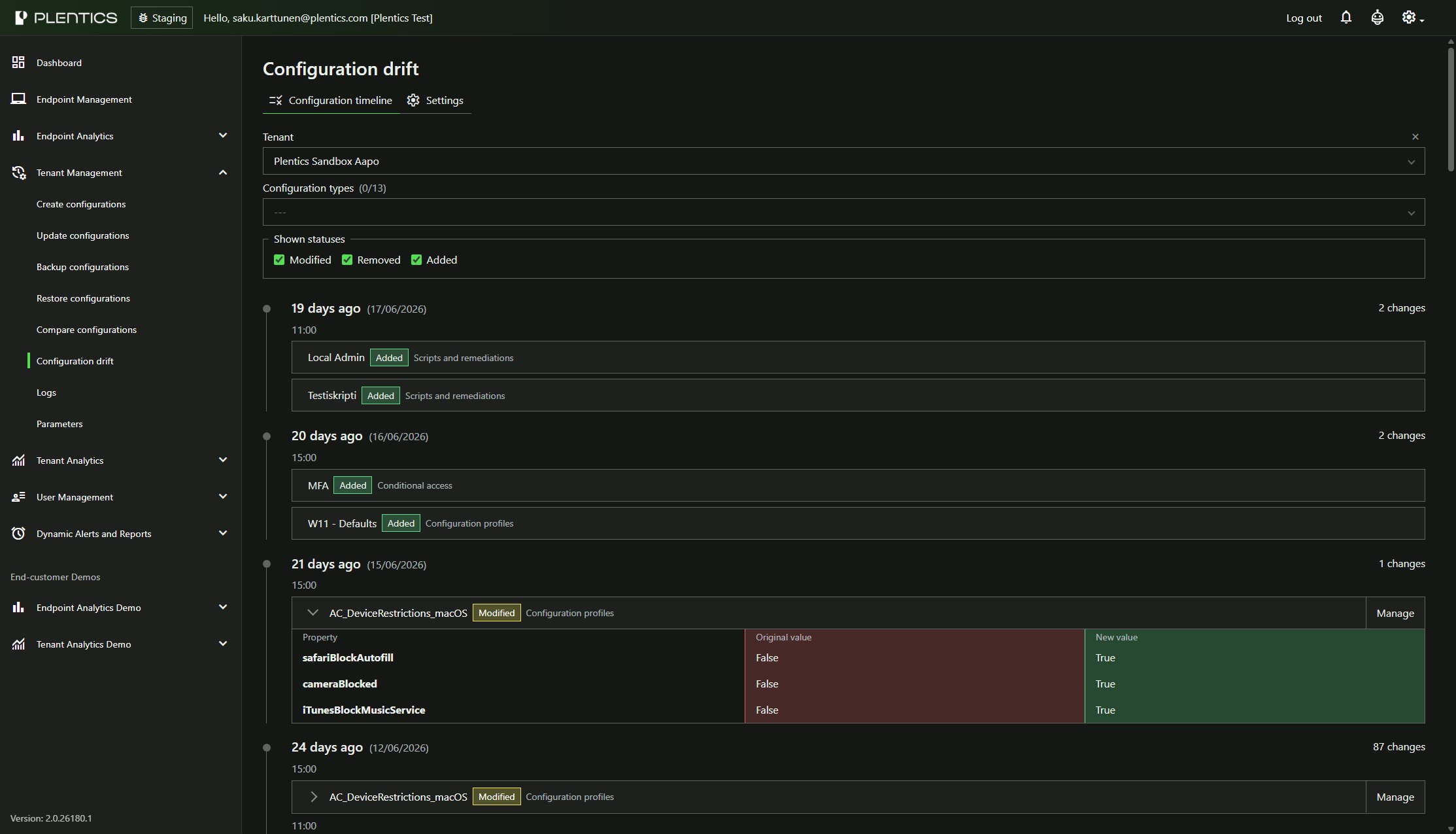
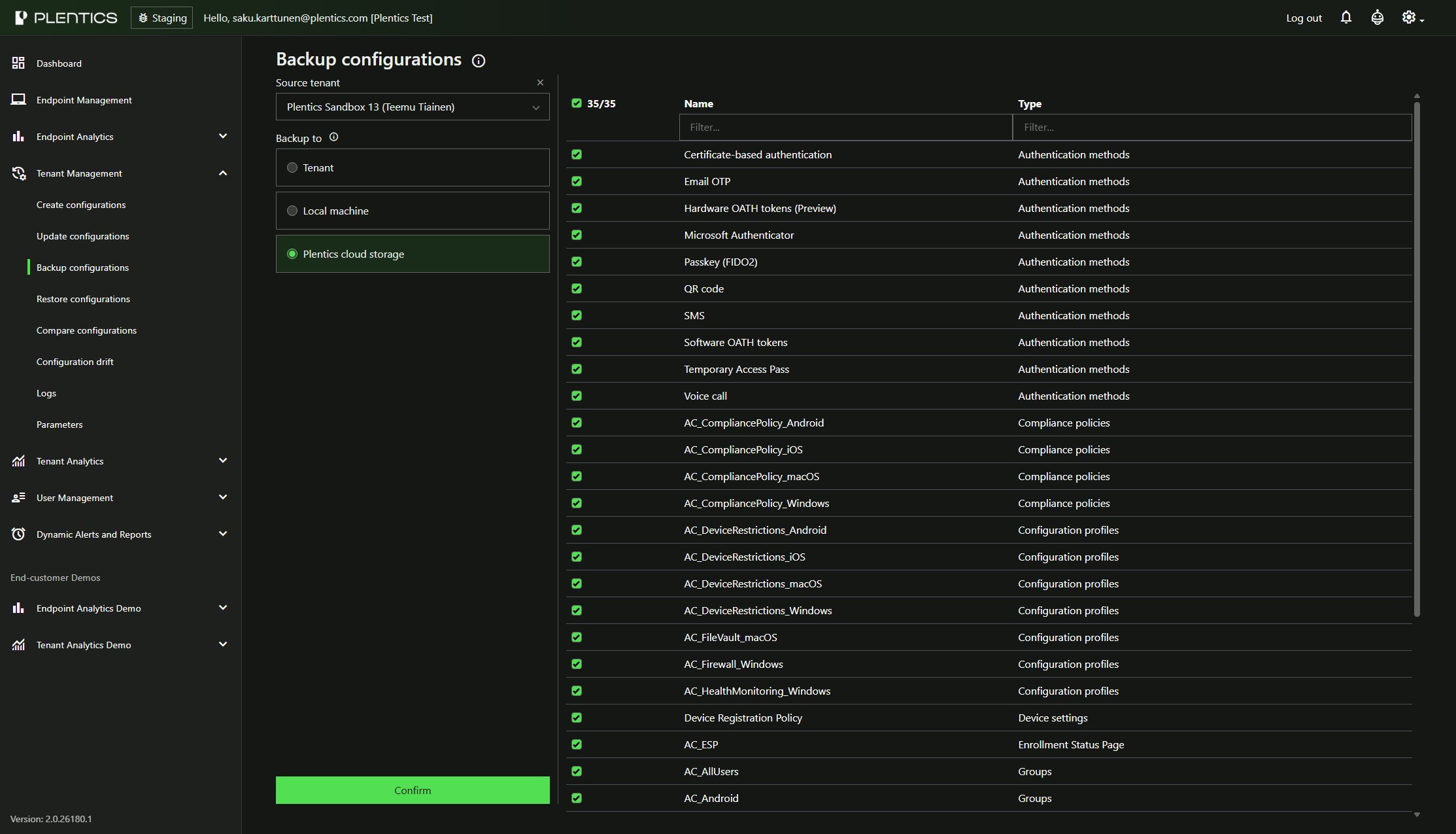
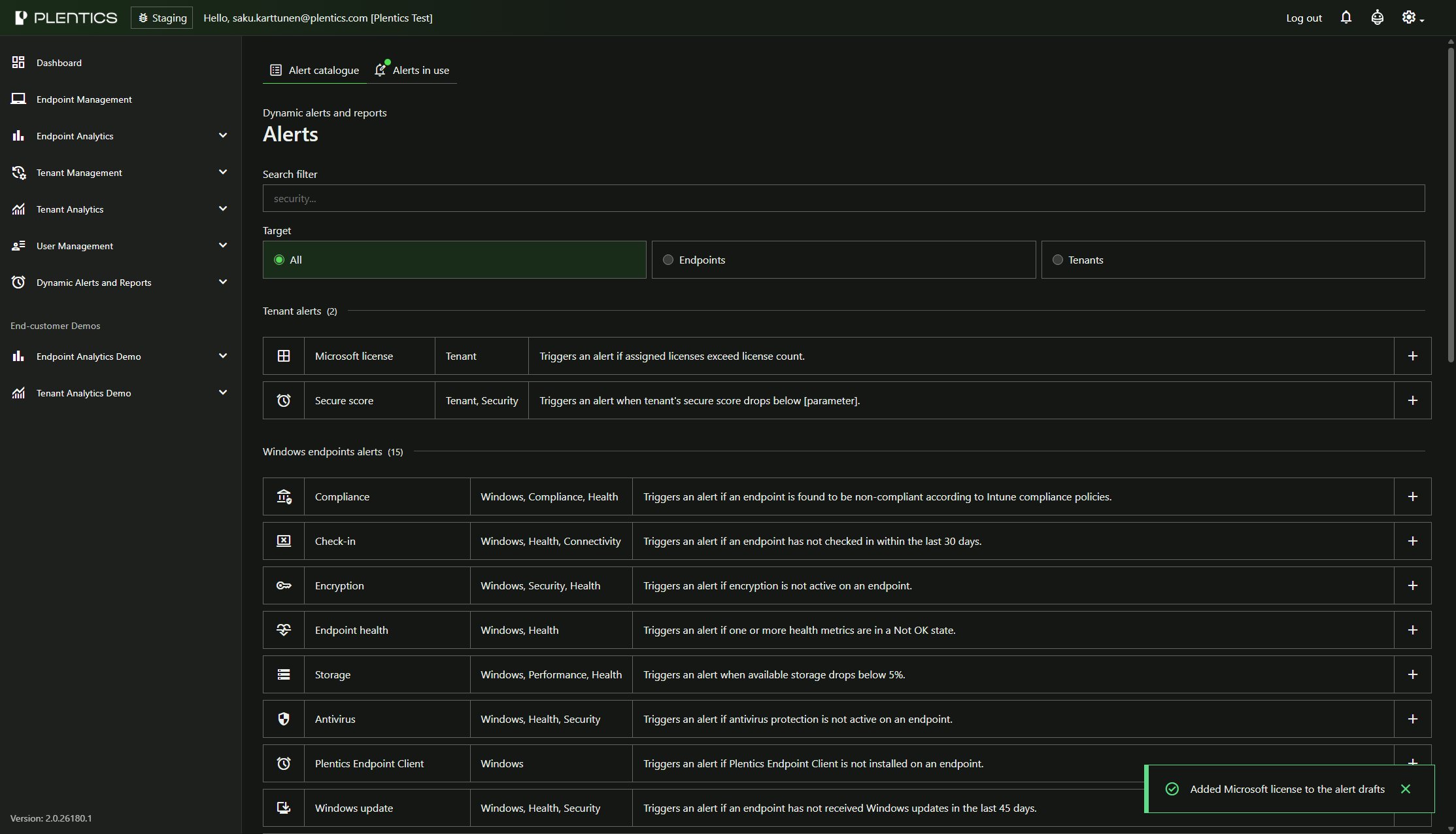
The Feature table helps you understand where each capability fits within the MSP service lifecycle and which operational teams benefit from it.
| Lifecycle phase | MSP Teams | |||||||
|---|---|---|---|---|---|---|---|---|
| Feature name | Status | Onboarding | Managed services | Service desk | Endpoint Management | Tenant management | Security & Compliance | Service Management |
| Endpoint management | ||||||||
|
3rd party patching
| ||||||||
|
Description Secure your customer environments and save time by automatizing patching of hundreds of Windows and macOS apps using Plentics catalogue. |
Platform
| |||||||
|
Application templates
| ||||||||
|
Description Save a lot of time by creating and managing application assignments across tenants based on templates. |
Platform
| |||||||
|
Custom applications
| ||||||||
|
Description Generate cross-sales and save time offering customer-specific application packaging and deployment for your end customers. |
Platform
| |||||||
|
Configuration Packages
| ||||||||
|
Description Deploy custom configurations that are not available through standard Intune configuration profiles. |
Platform
| |||||||
|
Custom configuration packages
| ||||||||
|
Description Generate cross-sales and save time offering customer-specific configuration packages for the settings that are not available through standard Intune configuration profiles. |
Platform
| |||||||
|
Executing Intune remote actions
| ||||||||
|
Description Run remote actions on selected endpoints across tenants. These actions include but are not limited to remote sync, device restart, wipe, retire, anti-virus scan, etc. |
Platform
| |||||||
|
Entra ID groups
| ||||||||
|
Description Easily explore Entra ID groups and add or remove group members. | ||||||||
|
Single pane of glass endpoint visibility
| ||||||||
|
Description Improve your problem solving capabilities and 1st contact resolution rate having instant multitenant viev across end customers, endpoints, applications, users and much more. |
Platform
| |||||||
| Tenant management | ||||||||
|
Compare configurations
| ||||||||
|
Description Compare configurations across multiple tenants, identify differences and detect missing settings. Very powerful tool to help you discuss with an end customer when planning an onboarding. | ||||||||
|
Create configurations
| ||||||||
|
Description Save a lot of time by creating complete or partial tenant configurations based on templates by a couple of mouse clicks. Help your customers deployiyng secure, ready-to-use tenant configurations in minutes while reducing time-to-value in your service delivery. | ||||||||
|
Update configurations
| ||||||||
|
Description MSPs can make configuration changes across multiple customers in a single operation. Consistent and healthy tenant baselines reduce the chance of user-impacting misconfigurations. | ||||||||
|
Configuration drift control
| ||||||||
|
Description Configuration Drift helps MSPs keep customer tenant configurations aligned with approved baselines by automatically detecting configuration changes, sending email notifications, and enabling unwanted changes to be reviewed and remediated directly from a tenant-specific timeline. Drift scans run every six hours, and change history is retained for 90 days. | ||||||||
|
Tenant templates
| ||||||||
|
Description Manage as many tenant templates as you need to cover your most common customer scenarios for efortless onboarding and managing of customer environments. Template-based management minimizes human error and support reliable configuration deployment even during staff turnover. | ||||||||
|
Backup configurations
| ||||||||
|
Description Reduce risk of your and your end customers' business continuity by backing up critical tenant configurations regularly. It doesn't harm if you need to quick recovery because of minor incidents or errors either. | ||||||||
|
Restore configurations
| ||||||||
|
Description Quickly restore chosen tenant configurations of any end customer if you need to recover in a case of smaller or larger incident. | ||||||||
| Alerts and Analytics | ||||||||
|
Endpoint Analytics
| ||||||||
|
Description In a case of problem solving or gathering an overview, dynamic, on-demand reports empower users to access status and health overview or detailed insights for any end customer, end user, desktop, laptop, or mobile device as needed. End-customer representatives may be accessed to their customer-specific data. |
Platform
| |||||||
|
Tenant Analytics
| ||||||||
|
Description With a single-pane-of-glass view across all end-customer tenants, users gain comprehensive oversight, simplifying management and issue detection. | ||||||||
|
Dynamic alerts
| ||||||||
|
Description Improve your end customer experience by utilizing alerts triggered based on any analytics details. Be proactive sending alerts to your ITSM or even directly to end user. | ||||||||
|
Dynamic reports
| ||||||||
|
Description Reports can be automatically generated and sent directly to recipients’ inboxes, reducing manual effort and ensuring stakeholders remain informed. Reports can be configured for any area of interest, ensuring that administrators and stakeholders receive the information they need on a regular basis. | ||||||||
|
Analytics view for end customers
| ||||||||
|
Description Add value for your end customer decision makers by granting them access to Analytics views. | ||||||||
|
Microsoft license tracking
| ||||||||
|
Description Make significant savings for your end customers by exploring their Microsoft licenses, finding overlapping or useless licenses and getting rid of them. | ||||||||
|
Secure Score tracking
| ||||||||
|
Description Users can efficiently track and monitor Secure Score trends for every tenant, ensuring continuous improvement and maintenance of security standards throughout the multi-tenant environment. Business people can use the data for new sales opportunities. | ||||||||
|
Device warranties
| ||||||||
|
Description Warranty tracking is streamlined by enabling the monitoring of warranty details across all managed devices. This allows for proactive maintenance planning and reduces the risk of unexpected device failures. | ||||||||
|
XMLA export
| ||||||||
|
Description Utilize all the date from Plentics to combine it with your own data and build comprehensive reporting solution for your team and customers. | ||||||||
|
Integrations
| ||||||||
|
Description Top up your ITSM data with Plentics Suite data to get everything out from your ITSM and replenish asset information. Dynamic alerts integrated into Teams or ITSM platforms mean issues are picked up and resolved faster. | ||||||||
Frequently Asked Questions
What is Plentics?
Plentics is a cloud-based platform built for Managed Service Providers that want to standardize, automate, and scale endpoint and tenant management in Microsoft Intune and Microsoft 365 environments. It helps MSP teams reduce manual work, improve operational consistency, and gain better visibility across customer environments.
Who is Plentics designed for?
Plentics is designed specifically for MSPs and IT service providers that manage multiple customer environments. It is especially relevant for teams responsible for endpoint management, workplace services, service desk operations, architecture, governance, and service standardization.
What business problem does Plentics solve?
Plentics helps MSPs solve a common growth problem: how to manage more customer environments without adding complexity and headcount at the same pace. By automating repetitive tasks and standardizing service delivery, Plentics supports better scalability, lower operational overhead, and more predictable service quality.
How does Plentics help with multi-tenant management?
Plentics gives MSPs a centralized way to manage multiple customer tenants and endpoint environments. Teams can work with templates, configurations, standardized processes, and shared operational views instead of handling every environment separately. This reduces switching between consoles and helps maintain consistency across customers.
Can Plentics help us standardize customer environments?
Yes. Standardization is one of the core use cases for Plentics. MSPs can use it to create, maintain, and roll out repeatable configurations and operating models across customer tenants, while still allowing controlled exceptions when a customer has specific requirements.
Does Plentics support configuration backup, restore, and comparison?
Yes. Plentics is built to support safer and more controlled tenant management. This includes capabilities around configuration backup and restore, as well as comparison between configurations and environments. These capabilities help MSPs identify differences, reduce drift, and improve governance.
How does Plentics help with configuration drift?
Configuration drift is a common challenge in MSP environments where customer tenants evolve over time. Plentics helps teams detect differences between intended configurations and actual environments, making it easier to spot inconsistencies, troubleshoot issues faster, and maintain a more predictable security and service baseline.
What kind of analytics does Plentics provide?
Plentics provides operational analytics and reporting that help MSPs understand what is happening across customer environments. This can include visibility into endpoints, software, licenses, security posture, and other service-relevant data points. The goal is to support both day-to-day operations and more proactive service management.
Can we enrich analytics with our own customer data?
Yes. Plentics can support the use of additional customer-specific data to make reporting and analytics more useful. This can help MSPs combine technical operational data with business context, such as lifecycle, asset, or service-related information, to create more relevant reporting and actions.
Does Plentics support proactive alerts and reporting?
Yes. Plentics is designed to help MSPs move from reactive administration toward more proactive operations. Teams can use reporting and alerting to identify important changes, risks, or operational exceptions earlier, which helps service teams act before issues become bigger problems.
Can Plentics support service desk and support teams, not just technical specialists?
Yes. Plentics is not only for deeply technical administrators. It can also support service desk, support, security, service and even account management teams by making relevant operational data more accessible and actionable. This helps teams work faster, with better context, across customer environments.
Does Plentics integrate with ITSM and other external systems?
Yes. Plentics is designed to fit into MSP operating environments and can be connected with other systems where needed. Integration use cases often focus on operational visibility, data flow, and improving service processes across tools rather than creating yet another isolated management layer.
What about security, compliance, and audit requirements?
Security and governance are a core part of the Plentics approach. Plentics is built to support controlled operations, standardization, and traceability in Microsoft-focused service environments. For organizations with formal security or audit requirements, the platform is positioned to support structured governance and security-driven operating models.
Where is data hosted?
Plentics is a cloud-based solution built for secure operational use. For MSPs and enterprise customers that need clarity on hosting and regional considerations, data residency and deployment discussions can be addressed as part of the commercial and technical review process.
How is Plentics priced?
Plentics follows a modular SaaS model that supports phased adoption. This allows MSPs to start with the capabilities that matter most and expand over time as their operating model evolves. Pricing discussions can be aligned to the scope of use, service model, and growth plan.
Can Plentics support phased adoption instead of a full platform rollout at once?
Yes. Many MSPs prefer to adopt new operational tooling in stages. Plentics supports a modular approach, so organizations can start with the most immediate use case, such as tenant management, analytics, or operational standardization, and expand when the value is proven.
Does Plentis replace Microsoft Intune or Microsoft 365?
No. Plentics is designed to complement Microsoft Intune and Microsoft 365, not replace them. It adds multi-tenant orchestration, operational visibility, standardization, and MSP-focused process support on top of the Microsoft ecosystem.
Is Plentics a replacement for RMM tools?
No. Plentics is not positioned as a generic replacement for every RMM use case. It is best understood as an MSP-focused platform for Microsoft-centric tenant and endpoint management, operational standardization, analytics, and governance. In many environments, it works alongside other tools as part of a broader service stack.
Can Plentics support mobile and Mac environments?
Yes. Customer discussions show growing interest in both mobile device management and macOS support. Plentics is aligned with modern endpoint management needs and supports MSPs that want broader operational consistency across different device types in Microsoft-led environments.
How long does implementation typically take?
Implementation depends on the MSP’s scope, service model, and priorities. In many cases, the fastest route is to begin with a focused use case, align the operating model, and expand from there. A phased implementation typically makes it easier to show value quickly and reduce change friction.
How do we know if Plentics is a good fit for our MSP?
Plentics is a strong fit when your organization manages multiple customer tenants, wants to reduce manual operational work, needs better standardization, and sees Microsoft Intune and Microsoft 365 as a central part of service delivery. If your growth depends on scaling operations without scaling complexity at the same rate, Plentics is likely worth evaluating.